How to Check Whether a New Account Claiming to Replace a Deleted Social Media Account Is an Impersonation Account
When a well-known content creator, a public figure, or a personal friend suddenly disappears from social media, it creates a confusing gap. Within a few days, a new account often pops up on your feed using a familiar name, carrying a post that says, “My old account got deleted, this is my new backup profile!”
It is very easy to click “Follow” and send a quick welcoming message. Unfortunately, cybercriminals and impersonators actively monitor deleted profiles to build lookalike accounts. They exploit your existing trust in the original person to run fake investment schemes, ask for urgent money transfers, or drop dangerous phishing links into your private messages. Learning how to check account join dates, inspect profile details, and verify claims across official channels will keep your personal data and wallet safe.
Why scammers create fake accounts right after a profile gets deleted
Understanding why impersonators rush to copy deleted accounts helps you spot their tricks before taking any action.
Stealing usernames and using lookalike spellings
When an account is permanently deleted, its exact username (handle) becomes available again after a short system waiting period. Scammers use automated scripts to claim popular usernames the second they are released.
If the original username is unavailable, scammers register clever lookalike variations. They might add a small underscore, insert an extra letter, or use visually identical characters—such as replacing a lowercase l with an uppercase I (e.g., changing @artist to @artIst). To a quick glance on a small mobile screen, the handle looks identical to the original one you remember.
Copying old photos and bio text to build quick trust
An empty profile looks suspicious. To trick followers into believing the new account is real, scammers mass-download old photos, profile banners, and bio text from archived web pages or secondary social channels.
They set up the fake profile within minutes, posting ten or twenty old photos all at once. This creates an immediate illusion of authenticity. When an unsuspecting follower sees familiar photos and the exact same bio quote, they assume the person simply re-uploaded their favorite memories after creating the new account.
A simple guide to telling real replacement accounts from fake ones
To quickly evaluate whether a new profile is genuine or a fake copy, use this simple checklist before following or sending messages:
| Account area | Signs of a real replacement | Red flags of a fake account | What you should do |
| Username & handle | Matches the original name or was announced publicly on their website. | Uses extra numbers, underscores, or tiny spelling mistakes. | Unfollow immediately if the handle looks slightly off. |
| Join date & age | Created on or after the date the old account was deleted. | Created months before the old account was deleted, or just a few hours ago. | Check the join date in account settings before replying. |
| Posting behavior | Posts new updates naturally over time. | Re-uploads ten old photos all at once, then immediately sends private messages. | Ignore any sudden private messages asking for money or link clicks. |
Account signs that reveal a fake replacement profile
Beyond looking at the username, digging slightly deeper into the account settings will reveal clear technical proof of a fake account.
Creation dates and former username history in account settings
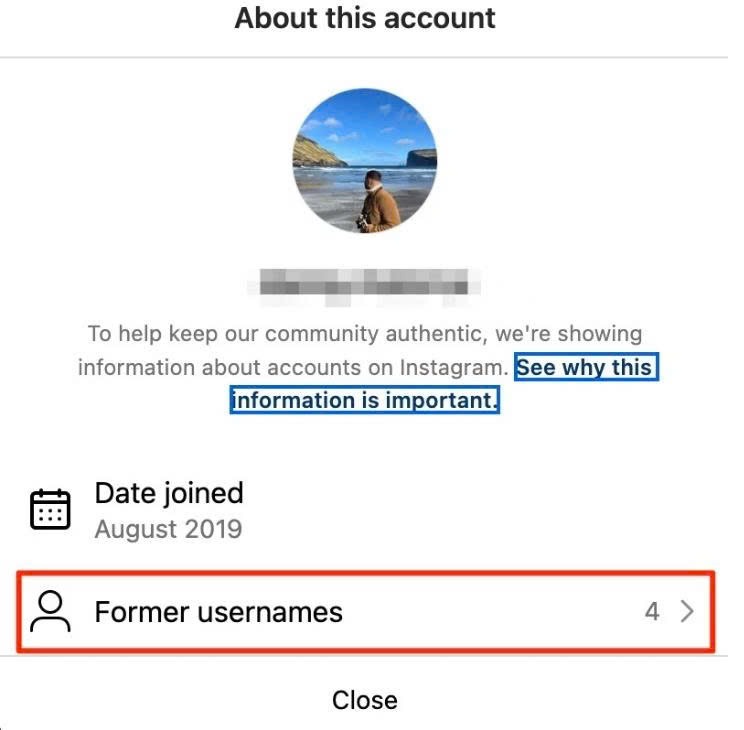
The single most reliable proof of an impersonation account is the join date. A genuine replacement account can only be created after the original account was deleted or lost.
Most major platforms allow you to view account age and history:
- On Instagram: Tap the three dots on the profile, select About This Account, and look at Date Joined. This section also displays Former Usernames, showing if the account previously belonged to a completely different person before changing its name to imitate your friend or creator.
- On X (Twitter): Look at the bio section for the “Joined [Month/Year]” stamp. If the “new backup account” claims it was created yesterday, but the join date says 2021, the scammer simply renamed an old spam account.
Low-quality copied photos and sudden messaging requests
When scammers copy old photos, the images lose visual quality. Because they are re-downloading compressed photos from web pages, the new profile picture and banner image will often look slightly blurry, pixelated, or cropped strangely around the edges.
Furthermore, pay attention to how the account behaves. Genuine creators rebuild their audience slowly on public posts. Fake accounts almost immediately slide into your Direct Messages (DMs). If a “new backup profile” sends you a private message within hours of following you – especially if they ask for a favor, offer a financial deal, or ask you to click a link – it is 100% a scam.
Safe steps to verify an account on other platforms before replying
Never rely on the new account’s own posts to prove its identity. An impersonator can easily post, “Yes, it’s really me!” in their bio or public comments.
Looking for official announcements on personal websites or YouTube
To get absolute proof, step outside the immediate social media app and check independent primary sources.
If the person or creator runs a personal website, a newsletter, or a verified YouTube channel, go there directly. Legitimate public figures always post an official announcement on their main website or YouTube community tab when their primary social media account gets hacked or deleted. If their official website makes no mention of a new social media profile, the new account is an unauthorized fake.
Reporting fake accounts without answering private messages
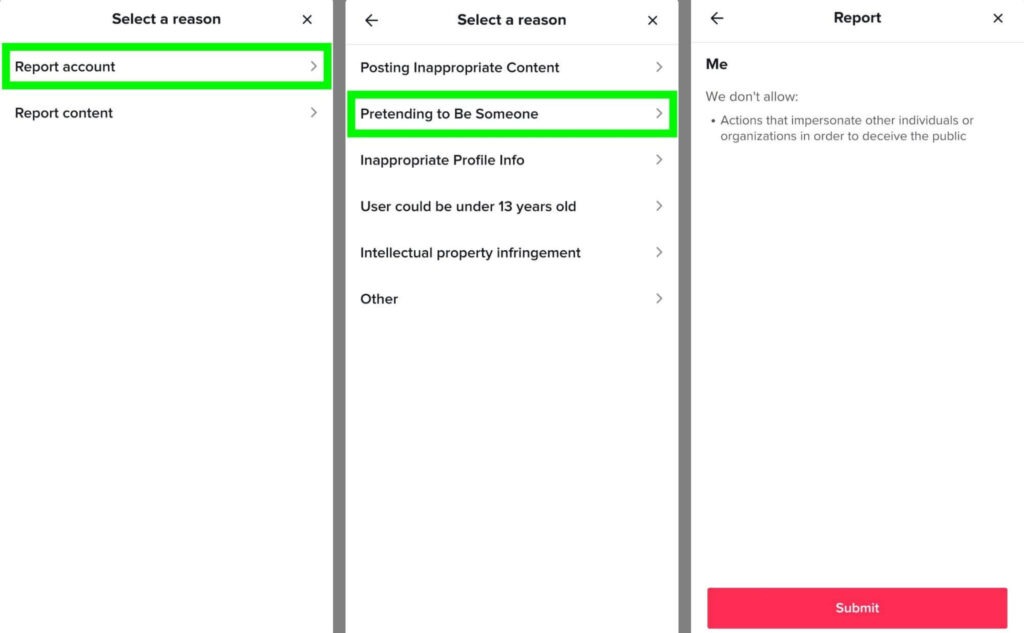
If you confirm the account is an impersonator, do not send them a private message to confront them. Replying lets the scammer know your account is active, making you a target for future spam campaigns. It also tells them which specific trick gave them away, helping them improve their fake profile to scam others.
Instead, use the platform’s built-in tool:
- Tap the three dots menu on the profile.
- Select Report and choose It’s pretending to be someone else.
- Select whether it is pretending to be a friend or a public figure.
- Block the account so they can no longer see your profile or send you messages.