Differences Between Broadcaster Replay Services and Archives Managed by Production Companies
A production credit does not tell you where a program can currently be watched. The broadcaster may operate the program page, an OTT service may hold the full VOD, and the production company may only maintain a catalog or licensing page.
This happens because television broadcasting and on-demand internet transmission are treated as different uses. Korean copyright guidance distinguishes broadcasting, in which viewers receive content at the same time, from transmission, in which each viewer chooses when and where to access it. A broadcaster can therefore have permission to air a program without controlling every form of online VOD.
Start With the Exact Episode, Not the Production Credit
Begin with the program title, episode number, original broadcast date, season, and broadcaster. Searching only the production-company name can lead to a company profile, licensing catalog, trailer, or international sales page rather than a playable episode.
Open the broadcaster’s official program page and then the page for the exact episode. Check whether it provides:
- A full replay
- A short preview
- Individual clips
- A link to another licensed platform
- A delayed free-viewing date
- A copyright or distribution restriction
A current KBS episode page, for example, can offer a three-minute preview, direct viewers to Wavve for the full VOD, and state that free VOD will become available three weeks after the broadcast ends. This shows that even one official episode page can contain several access routes with different timing and conditions.
Broadcaster pages are not automatically free. Current MBC replay pages may require login for one viewing option and a paid pass for another. The conditions must be checked on the exact episode rather than inferred from the broadcaster’s name.
Availability can also differ by episode. SBS still maintains episode pages that explicitly state that the particular VOD cannot be provided because of copyright issues. A series having a replay section therefore does not guarantee that every episode is playable.
Broadcaster Replay, Licensed OTT, and Production Catalog Are Different Sources
The term “production-company archive” can be misleading. Some production companies maintain consumer-facing video libraries, but others provide only work catalogs, promotional material, press information, or licensing contacts.
Use the visible function of the page rather than its owner’s name.
| Source | What It Can Confirm | What to Check Before Watching |
|---|---|---|
| Broadcaster program page | The program, broadcast date, episode number, clips, and current replay route | Whether the page offers full VOD, preview only, paid access, delayed access, or a rights restriction |
| Licensed OTT or IPTV service | The exact season and episode currently available on that platform | Subscription tier, price, region, expiration, devices, subtitles, and download support |
| Production-company works page | The company’s involvement in producing, investing in, or distributing the title | Whether it has an actual player or merely links to a distributor, broadcaster, or OTT service |
| Official social or news page | Announcements about releases, platform moves, or special editions | Whether the post links to a current licensed viewing page |
SLL, for example, organizes its works into television, OTT, digital originals, and films, and describes its business as covering development, production, investment, and distribution. That makes its website useful for confirming the company’s relationship to a title, but the works catalog should not automatically be treated as a consumer replay service.
The same caution applies to end credits. A company listed as producer may have created the program without holding the current Korean streaming rights. Another company may control domestic distribution, overseas sales, music, or a particular OTT window.
For viewers, the most useful question is not:
Which company produced this program?
It is:
Which official service currently has the right to provide this exact episode in Korea?
Version Labels and Access Terms Define What You Are Actually Paying For
Do not assume the production-company version is longer, unedited, or more permanent. Also do not assume the broadcaster version is exactly the television cut. Confirm what the listing actually says.
Compare these details:
| Detail | Why It Matters |
|---|---|
| Episode and season | Similar titles may lead to a remake, special, regional version, or another season |
| Content label | “Full VOD,” “preview,” “clip,” “highlight,” and “special video” are different products |
| Runtime | A short duration may reveal that the page contains a preview or edited version |
| Version name | Look for labels such as broadcast version, extended version, director’s cut, or remastered edition |
| Access window | The episode may expire, become free later, or remain available only during a licence period |
| Price and login | Access may require login, a single purchase, a broadcaster pass, or an OTT subscription |
| Region | A catalog page may show the title even when Korean playback is unavailable |
| Subtitles and audio | The same program may have different language and accessibility options across platforms |
| Device and download support | Web, mobile, smart-TV, and offline access may not be identical |
Runtime is a useful clue, but it is not proof that one version is complete. Credits, advertisements, introductions, music, or licensed footage may have been removed without the page being labelled “edited.” Use the version description and provider information together.
When the production company offers behind-the-scenes videos, deleted scenes, interviews, scripts, or production notes, treat those as supplementary material unless a full-episode player is clearly provided. Extra material does not establish that the site also holds replay rights.
Follow the Official Link Chain Until You Reach a Playable Listing
The fastest reliable process is:
Exact episode page → official full-VOD link → current OTT/IPTV listing → production-company catalog or support only when necessary
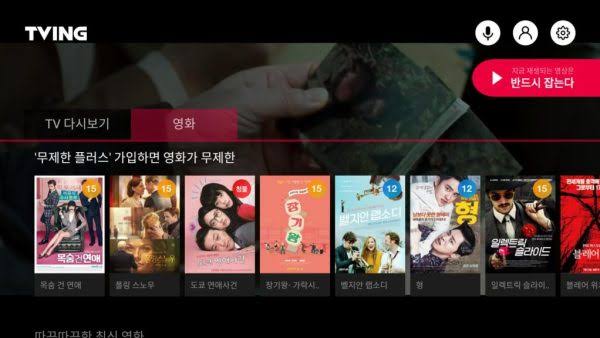
Start with the broadcaster because its program page usually identifies the correct episode. Follow any official link to Wavve, TVING, another OTT service, or a distributor rather than searching for unofficial copies.
If the broadcaster has no full replay, search the exact title, season, episode number, and original date on current Korean OTT and IPTV services. Confirm that the result is the complete episode rather than a clip or similarly named program.
Check the production company afterward. Its page may identify the current distribution partner, international title, alternate edition, or licensing contact. However, do not pay or register unless the page clearly explains that it is a viewing service and shows the relevant access terms.
When the official sources disagree, use the newest dated listing and contact the broadcaster or platform with specific information:
Is episode 8 of this program, originally broadcast on [date], currently available as full VOD in Korea? If so, which official service provides it, and until when?
The most suitable source is not automatically the broadcaster or the production company. It is the official listing that provides the correct episode, required version, acceptable access period, and clear payment conditions at the time you check.